
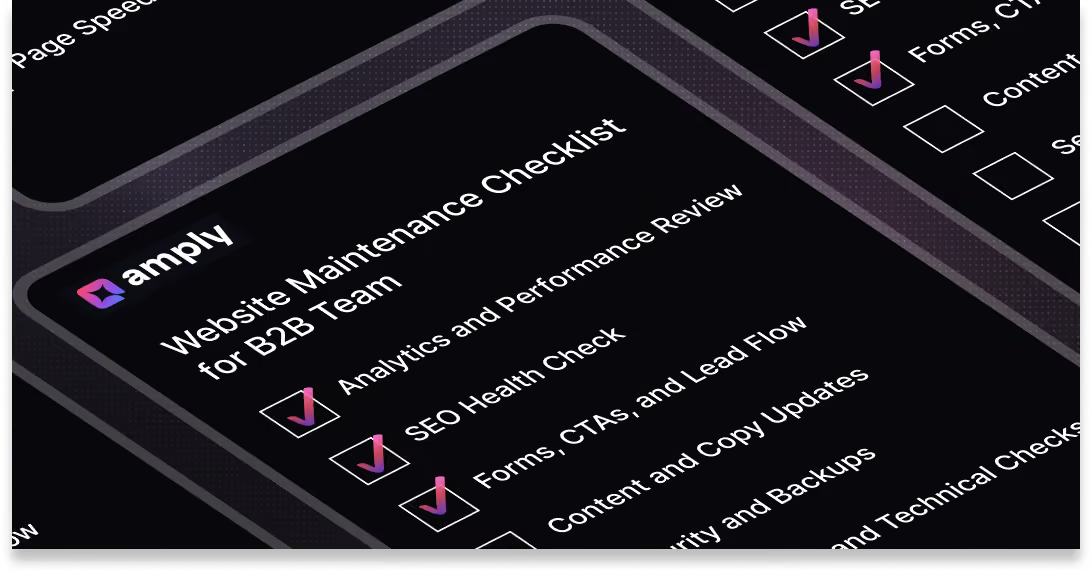
Most B2B marketing teams don’t actually have a website maintenance process.
They fix things when they break, update pages when someone flags an issue, and treat the site like a one-time project instead of a living growth asset. Over time, that approach quietly creates problems, traffic drops with no clear reason, forms stop working, outdated messaging lingers, and performance slowly degrades without anyone owning it.
This is where a structured checklist changes everything. Instead of reactive fixes, you move to a predictable system, what gets reviewed monthly, what gets audited quarterly, and what requires a deeper annual reset.
At a minimum, a monthly B2B website maintenance checklist should cover analytics review, form and CTA testing, page speed audits, SEO health checks including crawl errors and broken links, content updates, CMS backup verification, and a basic security scan. For Webflow sites specifically, you should also review CMS collection limits, Editor access, and the performance impact of any third-party scripts running on the site.
This guide breaks that down into a clear operating system for your website, what to check every month, what to review every quarter, and what to rethink annually. It also helps you understand a more important question most blogs skip: when this checklist stops being manageable in-house, and what a proper website maintenance retainer should actually cover.
Why B2B Teams Need a Formal Website Maintenance Process
Websites decay faster than most teams realise. Copy that felt sharp six months ago becomes outdated, product positioning drifts, links break quietly, and performance slows as new scripts and assets get layered in. None of this happens dramatically, it’s gradual, which is exactly why it goes unnoticed until something important stops working.
For B2B companies, the impact is amplified. Your website isn’t just a marketing asset, it’s often the first interaction a buyer has with your business and the final checkpoint before they convert. If messaging is off, pages are slow, or forms fail silently, you’re not just dealing with a “website issue”, you’re losing pipeline.
Without a defined process, maintenance defaults to reactive work. Someone flags a broken page, a campaign underperforms, or sales notices leads dropping, and only then does the team step in. This kind of firefighting creates inconsistent quality and pulls attention away from higher-impact work.
A formal maintenance process separates two things most teams blur together, technical upkeep and strategic improvement. One keeps the site functioning, the other keeps it competitive. You need both running on a schedule, otherwise the website slowly becomes something you maintain just enough to keep live, not something you actively use to grow.
Monthly Website Maintenance Checklist
This is the core operating layer for your website. If you do nothing else consistently, this is the checklist that keeps your site functional, measurable, and conversion-ready.
For most B2B teams, this takes 4–8 hours per month in-house. It’s also the baseline included in any legitimate website maintenance retainer, because skipping even a few of these checks is where problems start compounding.
Analytics and Performance Review
SEO Health Check
Forms, CTAs, and Lead Flow
Content and Copy Updates
Security and Backups
Page Speed and Technical Checks
Analytics and Tracking
This is what consistent website upkeep actually looks like. Not a vague “we’ll keep things updated,” but a defined system that ensures your site is accurate, fast, and converting every single month.
Most teams can manage a few of these tasks. Running all of them consistently is where things start slipping, which is why this level of monthly coverage is usually handled through a structured website maintenance retainer, rather than ad hoc fixes or internal bandwidth.
If you want to see how that’s typically structured, you can review what Amply’s website maintenance retainer includes.
Quarterly Website Maintenance Checklist
Monthly checks keep your site running. Quarterly reviews make sure it’s still working in the right direction.
This is where you step back from fixes and look at performance, structure, and messaging more critically, what’s driving results, what’s underperforming, and what needs to change.
Content Audit
- Review top 20 traffic-driving pages for accuracy and relevance
- Identify pages with high traffic but low conversion, flag for CRO improvements
- Identify pages with little to no traffic, consolidate, update, or remove
- Check blog content for outdated stats, broken links, or references to replaced products
SEO and Keyword Review
- Run a full keyword ranking report across priority pages
- Identify keyword cannibalisation issues between pages
- Update internal linking based on current priority pages
- Audit meta titles and descriptions across the site for alignment and CTR
UX and Conversion Review
- Review heatmaps and session recordings on key pages
- Test primary user journeys, homepage to product to demo request
- Evaluate lead forms for friction, remove unnecessary fields or steps
- Check whether CTAs are aligned with actual buyer intent
Integrations and Tech Stack Check
- Test CRM, marketing automation, and analytics integrations end-to-end
- Verify tracking pixels are firing correctly across key pages
- Check for deprecated API connections or expired tokens
- Review any new tools added in the last quarter for performance impact
Competitive and Messaging Audit
- Compare homepage messaging against 2 to 3 key competitors
- Identify positioning gaps or opportunities
- Evaluate whether your differentiators are still clear and accurate
- Flag if your site messaging no longer reflects your current go-to-market
This is also where teams start to question how much ongoing SEO and maintenance should actually cost. If you’re trying to benchmark that, you can read How Much Does Website Maintenance Cost here.
Quarterly is also a good time to evaluate whether your agency retainer is still serving your needs.
Annual Website Maintenance Checklist
This is the reset point.
Annual maintenance isn’t about small fixes or incremental improvements, it’s where you step back and evaluate whether your website still reflects your business as it exists today. These reviews typically involve marketing, sales, product, and leadership, because the decisions here impact positioning, structure, and growth direction.
Full Site Audit
- Run a complete technical SEO audit and site crawl
- Conduct an accessibility audit to check WCAG compliance, especially important for enterprise buyers
- Review privacy and compliance requirements, including GDPR, CCPA, and cookie consent setup
- Check domain, hosting, and SSL renewal timelines
Design and Brand Refresh Review
- Assess whether the site still aligns with current brand guidelines
- Check consistency of visual components across all pages
- Identify outdated imagery, icons, or UI patterns that reduce credibility
- Evaluate whether the overall design still reflects your market positioning
Site Architecture and Navigation
- Review sitemap to ensure it reflects current products, services, and messaging
- Identify orphan pages or navigation dead-ends
- Evaluate whether the information architecture supports your current buyer journey
- Check if key pages are easily accessible within 2 to 3 clicks
Goal and KPI Reset
- Set conversion benchmarks for the year ahead
- Review analytics setup to ensure you’re tracking meaningful actions
- Align website goals with sales and marketing OKRs
- Identify new opportunities for growth, expansion, or repositioning through the site
This is the layer most teams skip, and where the biggest gaps usually exist. A site can be technically maintained and still be strategically outdated, which is why this annual review matters just as much as everything you do month to month.
What B2B Teams Typically Miss
- Form-to-CRM delivery testing: Forms may submit successfully on the front end but fail to reach your CRM. This breaks lead flow silently and often goes unnoticed for weeks.
- Webflow CMS collection limits: On legacy or lower-tier plans, CMS collections can quietly hit limits. New items stop publishing, and teams don’t realise until content fails to go live.
- Sales enablement pages nobody owns: Pricing pages, one-pagers, and comparison pages sit between marketing and sales ownership. They get outdated fast and directly impact conversion quality.
- Event and campaign pages left live: Landing pages for webinars, trade shows, or campaigns often stay indexed long after they’re relevant, creating confusion and SEO clutter.
- Redirect decay from old campaigns: Redirects stack up over time from old campaigns and page changes. Broken or chained redirects accumulate quietly and start affecting SEO and user experience.
- Third-party script rot: Old chat widgets, unused analytics tools, abandoned ABM pixels, and legacy tag manager setups continue running in the background, slowing down your site.
- Design inconsistency creep: As teams publish new pages without design oversight, layouts, spacing, and components start drifting away from the original system, gradually eroding brand credibility.
Should You Run This Checklist Yourself or Outsource It?
You can absolutely run parts of this checklist in-house, especially the monthly layer. Most B2B teams can handle basic analytics reviews, content updates, and light technical checks in about 2–4 hours per month if someone owns it consistently.
Where things start to break down is at the quarterly level. CRO analysis, SEO audits, UX reviews, and integration checks require a different level of expertise and tools. This is also where teams start evaluating whether to hire internally or work with a partner, if you’re weighing that decision, you can read In-House Designer vs. Design Retainer: Which Is Right for B2B Teams.
The annual layer is even harder to manage internally. Site architecture, compliance reviews, accessibility, and brand alignment typically need cross-functional input and specialised knowledge. This is where most teams either delay work or make partial updates that don’t fully solve the problem.
A simple rule of thumb, if tasks from this checklist are sitting on your backlog for more than two weeks, you’ve outgrown DIY maintenance. At that point, it’s not about capability, it’s about consistency and speed.
This is where a structured website maintenance retainer comes in. Most retainers in the $3k–$4.5k/month range cover everything in the monthly and quarterly layers, with turnaround times of 1–3 days per task, so your team isn’t stuck waiting on fixes or juggling priorities.
If you want a clearer picture of how that works in practice, you can explore what amply’s website maintenance retainer typically includes.
Final Thoughts
Most B2B teams don’t struggle because they don’t know what to do. They struggle because there’s no consistent system for doing it. Without that structure, maintenance turns into reactive work, things get fixed late, priorities keep shifting, and the website slowly drifts away from being a reliable growth channel.
What this checklist gives you is clarity. What needs to happen every month to keep things running, what deserves deeper attention every quarter, and what requires a full reset annually. When this is in place, your website stops being something you “manage when needed” and becomes something that’s actively maintained, improved, and aligned with how your business is evolving.
The real question isn’t whether these tasks matter, it’s whether your team can realistically keep up with them alongside everything else. If not, that’s usually the point where teams move from ad hoc fixes to a structured system that ensures nothing critical slips through.


.avif)



.avif)